Locaty - GPS Location Share
- 3.8
- Rating
- 100.00K
- Installs
- Free
- Price
 Analysis by App-foxy
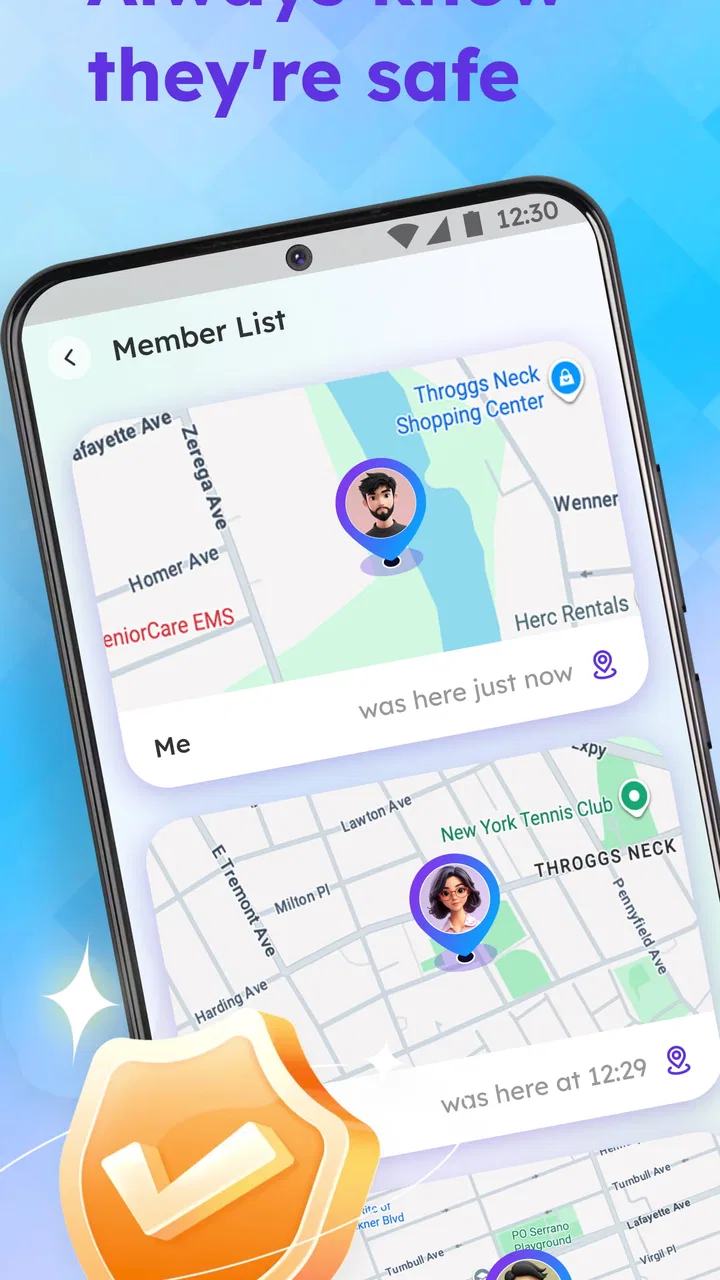
Locaty - GPS Location Share is the kind of navigation app that makes a strong first impression because its purpose is immediately understandable: help people share their location, stay connected, and create alerts around movement. I found the idea useful for everyday coordination, especially when a simple “I’m on my way” message is not enough. Instead of repeatedly explaining where I am, I can use a location-sharing tool to give someone a clearer picture of my journey.
That convenience is also the app’s central test. Location sharing is easy to try once, but an app earns a permanent place on a phone only when it remains dependable, comfortable, and simple enough to use without thinking. Locaty comes from XFree Dev Team and sits in the Maps & Navigation category. It is free to install, aimed at Everyone, and its current version is 1.0.8. The app has passed the early discovery stage with over ten thousand installs, but I would judge it less by that figure than by whether it fits naturally into a person’s routines.
From an appealing first week to a useful habit
During the first week, the attraction is obvious. A location-sharing app can remove small but repeated frustrations: waiting outside a building, meeting friends in an unfamiliar area, checking whether a family member has started a trip, or letting someone know that a delayed journey is still progressing. The practical value is not about staring at a map all day. It is about reducing messages and uncertainty at the moments when timing matters.
You May Also Like

 Blood Strike: 2.5 Anniversary
Blood Strike’s Loadouts Turn Every Drop Into a Tactical Gamble
A close look at Blood Strike’s custom loadouts: how fast access to signature weapons reshapes its battle royale rhythm, rewards preparation, and narrows the gap between fights.

 Pandora - Music & Podcasts
Pandora’s Music Is Easy to Start, but Harder to Recover
Pandora’s strength is its low-effort path from a seed to a station. Its weak spot is how much confidence it asks you to place in connection, setup, and quiet recovery.

 8 Ball Pool
 Is Built on Rivalries, Rematches, and Routine
A close look at the rivalries, rematches, shared routines, and unanswered safety questions that turn a quick pool match into a persistent mobile community.

 Samsung Music
’s Quiet Strength Is Playing What You Already Own
Its reach comes less from spectacle than from dependable access to a personal library. That simplicity is both the app’s strongest retention engine and its ceiling.

 AccuWeather: Weather Radar
AccuWeather Review: A Quick, Clear Forecast for Everyday Decisions
For everyday plans, the best forecast is the one you can understand quickly. AccuWeather makes rain timing, radar, and local conditions easy to act on, with a few trade-offs.

 Hill Climb Racing
Why Hill Climb Racing Still Turns Crashes Into One More Run
A tiny car, a bumpy hill and one more upgrade: Hill Climb Racing keeps resurfacing because its simple chaos makes every near-miss feel personal.
More From Our News Desk



I especially like the idea of combining location sharing with alerts. Sharing a position gives another person information now, while an alert can make that information useful later, when nobody wants to keep checking a screen. That distinction matters in real life. A person waiting for a pickup may not need constant updates; they may simply want to know when the other person is close. Used thoughtfully, Locaty can turn location data into a quieter form of coordination.
A realistic example would be a family member traveling home after an evening appointment. Rather than sending several messages about leaving, traffic, and arrival, they can share their location and let the other person follow the journey in a more direct way. The person waiting can concentrate on other tasks instead of repeatedly asking for an update. For a friend group meeting in a busy area, the same approach can reduce the familiar cycle of “Where are you now?” messages.
There is a useful social rule I would apply from the beginning: share only with people who genuinely need the information, and stop sharing when the reason has ended. Location tools feel friendly when they solve a specific problem, but uncomfortable when they become an automatic expectation. Locaty is most convincing as an intentional coordination tool, not as a replacement for trust or conversation.
The first-week experience is also when users should test how alerts fit their habits. An alert is valuable only if it arrives at a meaningful moment and does not create unnecessary noise. I would begin with one clear situation, such as a regular pickup or an arrival notification, before creating several overlapping reminders. This is one of the less obvious trade-offs: more automation can mean less effort, but poorly chosen alerts can make the app feel demanding rather than helpful.
Where it fits better than ordinary map apps
Standard map applications are usually excellent for finding addresses, planning routes, and checking traffic. They are not always designed around the personal question, “Can someone I trust know where I am right now?” Locaty’s focus makes it more direct for that situation. I do not need to turn a general-purpose map into a communication workaround when the main task is sharing a position safely and setting a useful notification.
Messaging apps can handle location sharing too, and they may be the better choice when a conversation is already happening there. Their advantage is familiarity: everyone may already know where to tap, and the location sits beside the rest of the discussion. Locaty has a clearer reason to exist when the user wants location coordination to be the main activity rather than one attachment inside a chat.
Dedicated family-safety services may offer broader monitoring systems, but that can be excessive for someone who only wants occasional sharing and alerts. Locaty seems better suited to people who want a focused tool without turning every trip into a formal tracking routine. On the other hand, anyone needing a large, established ecosystem for complex family management should compare carefully before switching from a service they already understand.
The important question is not whether Locaty can replace every map or messaging app. It cannot, and it does not need to. Its value comes from narrowing the task: making personal location updates easier to arrange and easier to use at the right moment.
What I would check before relying on it
Because location information is sensitive, I would treat the first setup as a privacy decision rather than a quick tap-through exercise. I would identify who is receiving the location, why they need it, and when the sharing should end. The safest habit is to create a clear purpose for every shared session. A journey to a meeting, a pickup, or a planned arrival has a natural endpoint; indefinite sharing deserves much more caution.
I would also test the app in a low-stakes situation before depending on it during an important trip. Send a location to a trusted contact, confirm that the recipient understands what they are seeing, and try the alert workflow before using it for a time-sensitive appointment. This is a practical step that many store descriptions skip, but it can reveal confusion early, when the consequences are minor.
Another useful habit is to keep a backup communication method available. A location app can support coordination, but it should not be the only way to communicate during a journey. If a person’s phone loses connectivity, the battery becomes unavailable, or the recipient misses an alert, a simple call or message may still be necessary. Location sharing should reduce uncertainty, not create false confidence.
Locaty is free to download, but it includes in-app purchases ranging from $2.99 to $12.99 per item. That makes it sensible to explore the basic experience first and decide whether any paid option solves a problem you actually have. I would not pay simply because an extra setting looks interesting. For an occasional user, the free starting point may be enough; for someone who depends on repeated alerts or more advanced convenience, the purchase decision should be based on regular use rather than the novelty of installation day.
Does the usefulness survive from month to month?
The second stage is where many location apps lose their appeal. After the first few shared trips, the novelty disappears. The question becomes whether Locaty supports recurring routines without asking for constant attention. I can see lasting value for people whose schedules naturally involve coordination: parents arranging pickups, housemates meeting after work, friends traveling together, or individuals who want a trusted contact to know when they are approaching.
For those users, the app can become a small piece of a routine. The strongest pattern is not continuous checking; it is predictable use at predictable moments. Before leaving, start the appropriate sharing action. During the trip, let the recipient use the information without repeated updates. After arrival, end the arrangement and return to normal. That workflow keeps the app useful while preventing it from taking over the day.
The month-to-month benefit depends heavily on whether the people around you adopt the same habit. A location-sharing app is rarely useful in isolation. If your family or friends refuse to use it, you may gain little beyond another way to send a map position. Locaty becomes more worthwhile when a small trusted group agrees on how and when to use it.
This is also where the app’s focused design can be an advantage over a crowded super-app. A general messaging platform may bury location controls among chats, photos, calls, and notifications. A dedicated tool can make the location task easier to remember. Yet that focus creates a dependency: if your contacts do not see a reason to install another app, the benefit may remain limited to your own side of the arrangement.
Useful routines that do not create extra work
I would use Locaty for events with a clear beginning and end rather than for permanent background observation. For example, a friend driving to a meeting could share their position until arrival. A caregiver coordinating a pickup could use an alert for the final stage of the trip. A group traveling through an unfamiliar place could share locations temporarily while everyone is moving between planned stops.
A less obvious use is reducing coordination pressure for the person who is running late. Instead of composing a detailed explanation while walking or driving, they can share a position and let the other person judge the situation. This does not excuse poor communication, but it can make a short delay easier to manage. The recipient gets context, while the traveler avoids typing at an unsafe or inconvenient time.
I would avoid setting up a separate alert for every ordinary movement. That can turn a helpful tool into a stream of interruptions. The better approach is to reserve alerts for decisions: when someone should leave to meet you, when a pickup is close, or when a journey has reached its intended destination. The more clearly an alert changes what the recipient should do, the more valuable it becomes.
Another month-to-month consideration is changing routines. A reminder or sharing arrangement that made sense during one season may become irrelevant after a schedule changes. I would review active habits occasionally and remove anything that no longer has a purpose. This is not a criticism unique to Locaty; it is the maintenance cost of any app that turns real-world behavior into automated notifications.
The maintenance burden is small, but not zero
Locaty is not an app I would install and then forget completely. Location-based tools need occasional attention because their usefulness depends on context. I would check that the intended contacts are still the right contacts, that alerts still match actual routines, and that temporary sharing has ended when it should. A minute of review can prevent an old arrangement from continuing unnoticed.
The phone itself also becomes part of the maintenance picture. Navigation and location services can be affected by battery-saving behavior, connectivity, and the device’s general condition. I would not use Locaty as the sole safety plan for a long journey or an emergency. It can support a plan, but it cannot remove the need for a charged phone, an agreed meeting point, and a backup way to reach someone.
New users may also need to explain the app to their contacts. “I shared my location” is not always enough. The recipient should know what action they are expected to take, whether they are watching a journey or waiting for an alert, and when the sharing is no longer relevant. That small explanation improves the experience more than adding another automated setting.
The current version is 1.0.8, which places the app in an early stage of its life rather than in the category of a long-established navigation platform. I would therefore approach it with reasonable expectations: test the workflows personally, keep important plans backed up, and pay attention to whether it continues to fit your routines. Early software can be perfectly useful, but long-term confidence comes from repeated dependable use, not from the first successful setup.
Where fatigue can appear
The biggest source of fatigue is notification overload. If every movement generates an update, the recipient may stop paying attention. That weakens the very safety and coordination benefit the app is meant to provide. I would rather have one well-timed alert than several vague ones. The app works best when users agree on what information matters before sharing begins.
A second source of fatigue is social pressure. Once a family or friend group starts sharing locations, people may feel expected to remain visible all the time. That is not a healthy default. Temporary sharing should remain acceptable, and declining to share should not automatically be treated as suspicious. Locaty can make coordination easier, but the surrounding agreement between users matters more than the feature itself.
There is also the friction of switching between apps. If a conversation starts in a messenger, moves to Locaty for location sharing, and then returns to the messenger for updates, the process may feel more complicated than sending a single message. The dedicated app has a clear advantage when the group already accepts it as part of the routine. Otherwise, the convenience may not outweigh the extra installation and habit-building.
Finally, some users simply do not need this category. If your trips are predictable, your meetings are nearby, and your contacts already use a messaging service effectively, Locaty may add little. It is not a universal upgrade to every phone. I would skip it if I rarely coordinate journeys or if I am uncomfortable with location sharing as a concept. A focused tool is useful precisely because it solves a focused problem; people without that problem should not feel obliged to create one.
My long-term verdict
After the initial appeal fades, I think Locaty can earn a lasting place for users with repeated coordination needs. Its strongest case is a trusted circle that wants straightforward location sharing and practical alerts without turning a general map app or chat thread into a complicated system. The free entry point makes it easy to test, while the paid items mean regular users should decide carefully which conveniences justify spending.
I would recommend it to families arranging pickups, friends meeting across busy areas, housemates coordinating arrivals, and travelers who want temporary sharing during a journey. I would also recommend starting with one routine, one trusted contact, and one meaningful alert. That approach reveals the app’s real value without creating unnecessary tracking habits or notification fatigue.
I would be more cautious about recommending it to someone seeking a complete emergency service, a broad family-management platform, or a replacement for an established messaging ecosystem. Those users may be better served by a tool that already covers their wider needs. Locaty’s strength is its narrower purpose, and its limitation is the same narrowness.
In my experience, the app’s long-term success depends less on how impressive location sharing feels on day one and more on whether it quietly removes friction from a repeated situation. If it helps your household or friend group coordinate without constant messages, it can become a useful background habit. If nobody around you wants another app, or if alerts quickly become noise, the installation will probably lose its appeal.
My final view is positive but measured: Locaty is worth trying when you have a specific, recurring reason to share location safely. Keep the sharing purposeful, review your alerts, maintain a backup communication method, and avoid treating visibility as an obligation. Used that way, this Maps & Navigation app from XFree Dev Team has a realistic chance of remaining useful after the novelty has worn off.
FAQs for Locaty - GPS Location Share
01What is Locaty - GPS Location Share, and how does it work?
Locaty - GPS Location Share is a mobile application designed to share your real-time location with friends and family. Using GPS technology, the app allows users to send their current whereabouts to trusted contacts. It’s ideal for coordinating meetups, ensuring loved ones' safety, or simply keeping in touch. The app requires GPS and internet access for accurate tracking.
02Is Locaty - GPS Location Share secure for sharing my location?
Yes, Locaty prioritizes user security and privacy. The app employs encryption to safeguard your data and shares your location only with contacts you approve. Users have control over who can see their location and can disable sharing at any time. Always ensure you only share your location with trusted individuals.
03Can I use Locaty without an internet connection?
While Locaty relies on GPS for location tracking, it requires an internet connection to share your location data with others. Without internet access, the app can still display your current location on the map, but it won't be able to transmit this information to your contacts until connectivity is restored.
04Does Locaty drain my phone’s battery quickly?
Locaty is designed to be efficient, but like any GPS-based app, it can impact battery life. The app periodically updates your location, which can consume more power compared to apps that don’t use GPS. To conserve battery, consider adjusting the frequency of location updates in the app settings or use it only as needed.
05What platforms is Locaty available on, and is it free to use?
Locaty - GPS Location Share is available for both Android and iOS devices. The app offers a free version with essential features for location sharing. There may also be premium options available for users who want advanced functionalities. Check your app store for the latest pricing and feature details.
Pros
- Real-time location sharing with friends.
- User-friendly interface and easy setup.
- Battery-efficient tracking options.
- Integrated chat for seamless communication.
- Cross-platform compatibility (iOS & Android).
Cons
- Requires constant internet connection.
- Limited features in free version.
- Some users report occasional lag.
- Privacy concerns with location sharing.
- Ads can be intrusive at times.

Locaty - GPS Location Share
Gallery